
You already know you need a remote desktop. You have probably sat through generic definitions, heard warnings about IP bans on freelance forums, and tried figuring out why your connection stutters when you connect to overseas virtual machines.
What is missing from most online advice is Pakistani RDP architecture by actual deployment objective: the real differences in routing, port handling, and IP reputation when connecting through Pakistani ISPs (PTCL, Nayatel, StormFiber, Transworld) versus international subsea backbones.
Whether you need ultra-low domestic latency (5–15ms) within Pakistan for banking portals and FBR IRIS tax filings, or high-bandwidth global infrastructure for Upwork, Fiverr, and automated Forex trading bots, this guide breaks down the mechanics, real benchmarks, and exact pricing plans.
Key Takeaways
- Two Distinct Flavors: Domestic Pakistan RDP (Karachi/Islamabad nodes) delivers 5–18ms latency for local banking & FBR compliance; Global Admin RDP delivers 1Gbps unmetered uplinks for international marketplaces and Forex EAs.
- Marketplace Account Protection: Dynamic residential ISP disconnects flag Upwork/Fiverr fraud filters. A dedicated static IPv4 RDP preserves session continuity even during local power outages.
- Admin vs. Shared: Never use shared bot RDPs for financial assets or client stores. You need 100% isolated ECC RAM and full Windows Administrator privileges.
- Local Currency Billing: Nextgen provisions all RDP configurations instantly with payments in PKR via JazzCash, EasyPaisa, Raast, or local bank transfer.
1. What is Pakistani RDP? Domestic vs. Global Remote Desktops
A Remote Desktop Protocol (RDP) server provides a virtualized Windows desktop hosted inside a 24/7 enterprise datacenter. For Pakistani users, server infrastructure is divided into two primary categories:
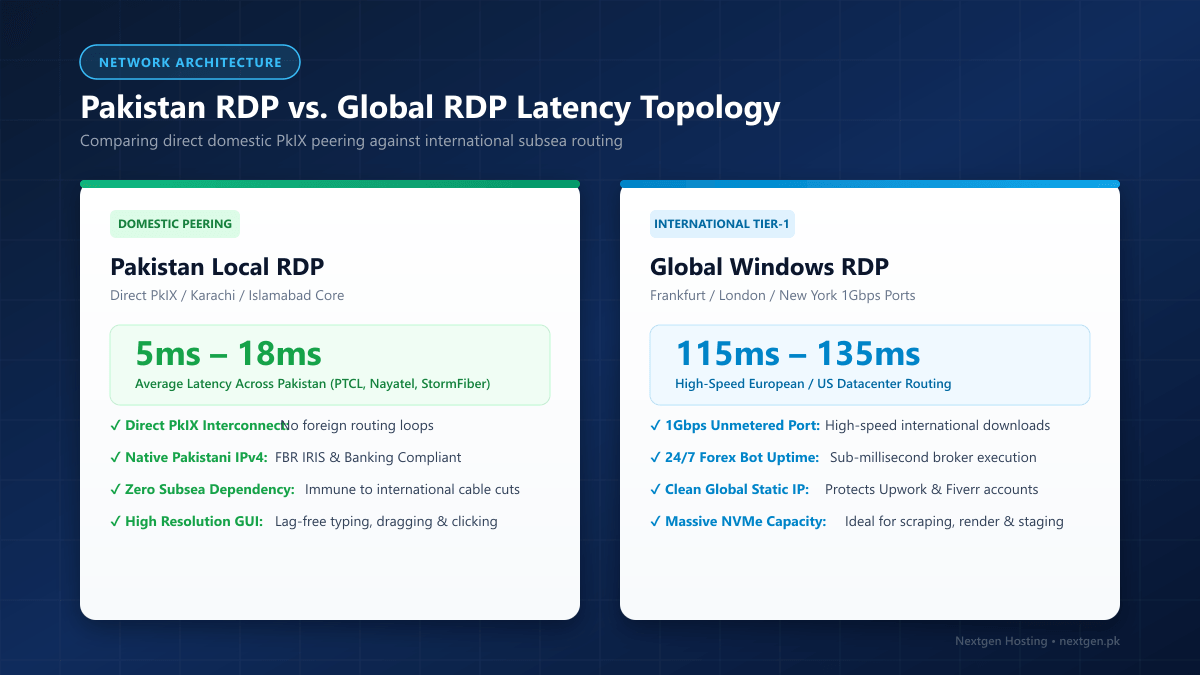
A. Domestic Pakistani RDP (Local Karachi / Islamabad IP)
- Data Center Location: Physically hosted inside Pakistani Tier-3 datacenters (Karachi or Islamabad).
- Network Routing: Direct peering with local ISPs (PTCL, Nayatel, StormFiber, Transworld, Cybernet) via the Pakistan Internet Exchange (PkIX).
- Latency: Single-digit millisecond response times (5ms to 18ms) across Pakistan.
- Primary Use Cases: Overseas Pakistanis accessing local banking apps (Meezan Bank, HBL, Bank Alfalah), FBR IRIS tax portal compliance, SECP filing, and local software testing where access from foreign IP addresses is blocked or flagged.
B. Global Admin Windows RDP (US / UK / EU Data Centers)
- Data Center Location: Hosted in high-tier international nodes (Frankfurt, London, New York, or Singapore).
- Network Routing: Connected directly to Tier-1 international backbones with multi-gigabit uplinks.
- Latency: 115ms – 135ms from Pakistan.
- Primary Use Cases: Running 24/7 automated Forex trading algorithms (MetaTrader 4/5), handling heavy video rendering, web scraping, and managing international e-commerce stores (Amazon US/UK, eBay, Walmart, Etsy) without local ISP throttling.
2. Top Use Cases for Pakistani RDP Users
1. Upwork & Fiverr Freelancer Account Protection
Freelance marketplaces continuously monitor login sessions for suspicious activity. If your home broadband connection disconnects frequently due to load shedding, or if your dynamic ISP assigns fluctuating residential IP subnets, security algorithms may flag your account for manual review or suspend it.
Why an RDP solves this: A dedicated Windows RDP provides a static, clean IP address and a persistent desktop. Even if your local electricity cuts out or your local Wi-Fi drops, your remote session remains online, safeguarding your freelancing reputation and active client contracts.
Always connect to your freelance dashboard from the exact same browser profile inside your RDP. Avoid alternating between your mobile phone data (Jazz/Zong) and your home fiber connection, as rapid IP location jumps trigger automated risk flags.
2. 24/7 Automated Forex Trading (MT4 / MT5 EAs)
Forex markets operate 24 hours a day. Running Expert Advisors (EAs) on a personal laptop risks power cuts, Windows automatic updates rebooting the machine, or ISP packet drops during high-volatility news releases.
Why an RDP solves this: An RDP instance runs 24/7 with 99.9% uptime, pure NVMe drives, and sub-millisecond execution times to European broker liquidity bridges, ensuring trading bots execute every tick without slippage.
3. Overseas Pakistanis Accessing Local Banking & Government Portals
Pakistani banking apps (HBL, Meezan, Askari, Standard Chartered Pakistan) and government utilities (FBR IRIS, NADRA verification, SECP) frequently restrict or geo-block access from foreign IP ranges to protect against cyber attacks.
Why an RDP solves this: Overseas workers and expats in the UAE, Saudi Arabia, UK, and USA connect to a domestic Pakistan RDP Server. They receive a clean Pakistani residential/datacenter IP that allows seamless authentication without SMS OTP blocks or account lockouts.
3. Performance Benchmarks: Domestic vs. International Latency
The performance of an RDP connection relies directly on Round-Trip Time (RTT) latency and packet consistency. Below are measured average ping latencies across major Pakistani broadband providers:
| User Location & ISP | Domestic Pakistan RDP (Karachi/ISB Node) | European Global RDP (Frankfurt/London) | US Global RDP (East Coast) |
|---|---|---|---|
| Karachi (StormFiber / PTCL) | 4 ms – 12 ms (Real-Time Fluidity) | 120 ms – 135 ms (Very Responsive) | 185 ms – 210 ms (Standard Typing) |
| Lahore (Nayatel / PTCL Fiber) | 8 ms – 18 ms (Instant) | 125 ms – 140 ms (Fluid) | 190 ms – 215 ms (Responsive) |
| Islamabad / Rawalpindi (Nayatel) | 6 ms – 15 ms (Instant) | 120 ms – 135 ms (Fluid) | 180 ms – 205 ms (Responsive) |
| Peshawar / Quetta (PTCL) | 14 ms – 24 ms (Smooth) | 135 ms – 150 ms (Acceptable) | 200 ms – 230 ms (Slight Delay) |
| Dubai / UAE (Etisalat / Du) | 35 ms – 45 ms (Excellent for Expats) | 90 ms – 105 ms (Smooth) | 180 ms – 200 ms (Responsive) |
4. Official Nextgen RDP Pricing Plans & Direct Order Links
Nextgen Hosting provides enterprise-grade Windows RDP servers equipped with 100% dedicated RAM, pure NVMe Gen4 solid-state storage, isolated compute cores, full Administrator rights, and seamless local payment options (JazzCash, EasyPaisa, Raast, Bank Transfer, and Credit/Debit cards).
Option A: Global Admin Windows RDP Plans (International Fast 1Gbps)
Best for freelancers, digital marketers, automated scrapers, and 24/7 Forex traders.
| Plan Name | vCPU | Dedicated RAM | NVMe SSD | Monthly Bandwidth | Monthly Price | Direct Checkout Link |
|---|---|---|---|---|---|---|
| RDP Basic | 2 Cores | 4 GB | 40 GB NVMe | 20 TB (1Gbps) | Rs. 4,489 /mo | Order RDP Basic → |
| RDP Power | 4 Cores | 8 GB | 80 GB NVMe | 20 TB (1Gbps) | Rs. 10,478 /mo | Order RDP Power → |
| RDP Ultra (Most Popular) | 4 Cores | 8 GB | 160 GB NVMe | 20 TB (1Gbps) | Rs. 13,485 /mo | Order RDP Ultra → |
| RDP Pro | 8 Cores | 16 GB | 160 GB NVMe | 20 TB (1Gbps) | Rs. 17,670 /mo | Order RDP Pro → |
| RDP Mega | 8 Cores | 16 GB | 240 GB NVMe | 20 TB (1Gbps) | Rs. 21,499 /mo | Order RDP Mega → |
| RDP Max | 16 Cores | 32 GB | 320 GB NVMe | 20 TB (1Gbps) | Rs. 32,488 /mo | Order RDP Max → |
👉 Explore full plan specifications and features on our Global Windows RDP Hosting page.
Option B: Domestic Pakistan Dedicated Local RDP Plans (5ms Local Latency)
Best for domestic banking authentication, FBR IRIS, and overseas access to Pakistan services.
| Plan Name | vCPU | Dedicated RAM | NVMe SSD | Network Bandwidth | Monthly Price | Direct Checkout Link |
|---|---|---|---|---|---|---|
| RDP Basic (PK) | 1 Core | 2 GB | 50 GB NVMe | 2 TB Bandwidth | Rs. 13,500 /mo | Order Basic (PK) → |
| RDP Plus (PK) | 2 Cores | 4 GB | 80 GB NVMe | 4 TB Bandwidth | Rs. 22,500 /mo | Order Plus (PK) → |
| RDP Ultra (PK) (Top Rated) | 4 Cores | 8 GB | 160 GB NVMe | 6 TB Bandwidth | Rs. 36,000 /mo | Order Ultra (PK) → |
| RDP Pro (PK) | 6 Cores | 16 GB | 350 GB NVMe | 8 TB Bandwidth | Rs. 72,000 /mo | Order Pro (PK) → |
👉 View detailed local routing and features on our Pakistan RDP Servers page.
5. Step-by-Step Connection Guide: How to Connect to Your Pakistani RDP
Connecting to your remote Windows desktop takes less than 60 seconds from any operating system:
Connecting from Windows
- Press
Win + Ron your keyboard, typemstsc, and press Enter to open Remote Desktop Connection. - In the Computer field, enter your server IP address (e.g.,
103.xxx.xxx.xxx:3389). - Click Connect.
- When prompted, enter your username (
Administrator) and the secure root password provided in your Nextgen welcome email. - If a security certificate warning appears, check “Don’t ask me again for connections to this computer” and click Yes.
- Your high-speed Windows desktop is now live and ready to use!
Connecting from macOS
- Download Microsoft Remote Desktop from the Mac App Store.
- Click Add PC (
+). - In PC Name, enter your server IP address.
- Under User Account, select “Add User Account” and enter
Administratorand your password. - Save the configuration and double-click the newly created card to start the session.
Connecting from Android & iOS (iPhone/iPad)
- Download the official Remote Desktop Mobile app by Microsoft from Google Play or the Apple App Store.
- Tap the
+icon in the upper-right corner and select Add PC. - Type your Server IP address and save your credentials.
- Tap the connection tile to launch the desktop directly on your mobile device.
6. Critical Security Checklist for RDP Servers
Never leave port 3389 open with a simple dictionary password. Automated botnets scan the global IPv4 address space continuously, attempting thousands of credential stuffing combinations per minute.
- Enable Network Level Authentication (NLA): Ensure NLA is enforced. NLA requires authentication before a complete RDP session handshake is created, mitigating denial-of-service and brute-force vulnerabilities.
- Change the Default RDP Port (3389):
Changing your RDP listening port in the Windows Registry to a non-standard port (e.g.,
54892) reduces malicious automated scanning by over 95%. - Configure Windows Defender Firewall with Advanced Security: Restrict incoming RDP connections exclusively to your home or office IP subnet whenever possible.
- Install Brute-Force Protection (IPBAN): Install IPBAN to automatically blacklist IP addresses that fail more than 3 consecutive login attempts.
7. Frequently Asked Questions (FAQs)
Can I pay for my RDP in Pakistani Rupees (PKR)?
Yes. Nextgen Hosting natively supports local Pakistani payment methods. You can pay via JazzCash, EasyPaisa, Raast (instant QR / IBAN transfer), and local bank transfers via Meezan Bank, HBL, Bank Alfalah, or any 1Link member bank, as well as Visa and MasterCard.
Do I get full Administrator access?
Yes. Unlike cheap “shared bot RDPs” where users are restricted to standard user privileges and shared browser sessions, all Nextgen RDP plans come with full Windows Administrator root rights. You can install any software, configure services, reboot your server, and manage firewall rules without restriction.
What is the difference between an RDP and a Cloud VPS?
Technically, a modern high-performance RDP is a virtualized Windows Cloud Server (VPS) pre-configured with Remote Desktop Services (RDS), audio redirection, graphical acceleration, and an active GUI desktop environment. While a standard VPS can run Linux or command-line Windows, an RDP is optimized out-of-the-box for interactive desktop use. If you need command-line Linux servers, view our Cloud VPS Hosting.
What bare-metal hardware options exist if I need dedicated physical power?
If your workload requires heavy enterprise databases or multi-user enterprise terminal servers, consider deploying on physical bare-metal hardware. Explore our enterprise Dedicated Servers for global routing or our Dedicated Servers in Pakistan for domestic enterprise compliance and local data sovereignty.
Deploy Your High-Speed Windows RDP Today
Experience zero lag, pure NVMe Gen4 speed, dedicated RAM, and 99.9% uptime. Choose between local Pakistani IP nodes or international high-speed 1Gbps ports with easy PKR payment options.
