
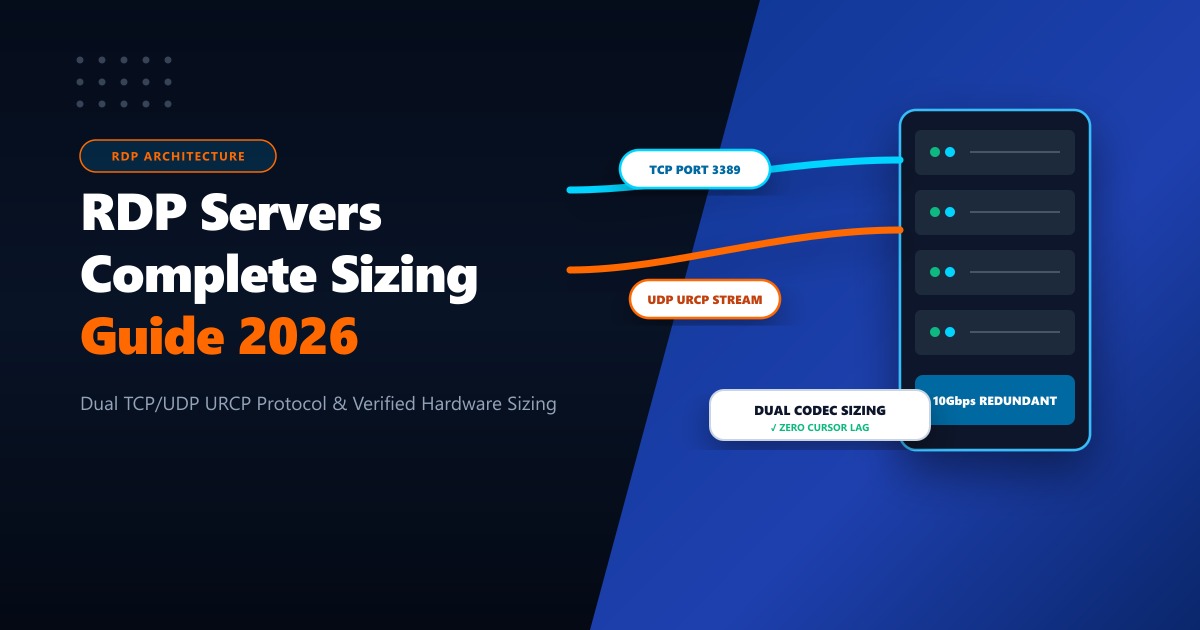
Remote Desktop Protocol (RDP) has evolved from a basic system administration utility into the backbone of global remote work, automated algorithmic trading, digital marketing operations, and enterprise software delivery.
Yet most online buying guides fail to explain how modern RDP actually works under the hood—how dual TCP/UDP transport works, why hardware-accelerated video codecs eliminate cursor lag, and exactly how many vCPU cores and gigabytes of RAM you need for your specific workflow.
This 2026 engineering guide breaks down modern RDP server architectures, compares RDP against alternative remote protocols, provides hardware sizing calculations, details performance tuning techniques, and presents full Nextgen pricing plans with direct ordering links.
Key Takeaways
- Dual TCP + UDP Transport: Modern RDP 10.x uses reliable TCP handshaking alongside UDP (URCP) for graphical rendering, eliminating frame drops over high-latency broadband.
- Hardware Sizing Formula: Light browsing requires 2 vCPU / 4GB RAM; automated Forex trading needs 4 vCPU / 8GB RAM; heavy SEO scraping demands 8 vCPU / 16GB RAM.
- Admin Rights Are Mandatory: Shared RDP pools prevent you from installing custom scripts or trading software. 100% Admin access ensures complete software freedom.
- Verified PKR Pricing: Plans start at Rs. 4,489/month for global 1Gbps nodes and Rs. 13,500/month for ultra-low latency (5ms) domestic Pakistan nodes.
1. How Modern RDP Servers Work: Protocol & Display Architecture
Developed by Microsoft, the Remote Desktop Protocol operates at the application layer of the OSI model, encapsulating graphical display commands, keyboard/mouse input, audio redirection, and clipboard synchronization across an encrypted channel (port 3389 by default).
Modern RDP (RDP 10.x and Windows Server 2022/2025) introduces major architectural leaps:
A. Dual TCP and UDP Transport Architecture
Traditional remote desktop solutions relied exclusively on TCP. While reliable, TCP packet retransmission can cause severe cursor lag and frame stuttering when packet loss occurs over long-distance international broadband.
- Modern RDP Optimization: Contemporary Windows RDP combines reliable TCP handshaking with high-throughput UDP transport (URCP - Universal Rate Control Protocol) for graphical streams. UDP delivers ultra-smooth 60 FPS motion and near-zero visual latency even over fluctuating mobile or home fiber connections.
B. Hardware-Accelerated Video Compression (AVC/H.264 & AV1)
Rather than transmitting raw screen bitmaps across the network, modern RDP servers employ intelligent region-based video encoding. Static desktop sections (text, window borders) are sent with lossless vector compression, while moving sections (video playback, dynamic browser animations) are compressed using hardware-accelerated H.264/AVC codecs.
2. Remote Protocol Showdown: RDP vs. VNC vs. TeamViewer vs. AnyDesk
Why do developers, algorithmic traders, and enterprises consistently choose dedicated RDP servers over alternative screen-sharing tools?
| Feature | Nextgen Windows RDP | VNC (Virtual Network Computing) | TeamViewer / AnyDesk | SSH with X11 Forwarding |
|---|---|---|---|---|
| Protocol Efficiency | Superior: High-speed graphics primitive caching | Poor (transmits raw pixel bitmaps) | Good (proprietary cloud streaming) | Fair (vector commands, high latency) |
| Multi-User Sessions | Native: Supports isolated simultaneous users | Single shared screen only | Single shared screen only | Multiple terminals, clunky GUI |
| Client Software | Built-in: Native client on every Windows/Mac/iOS/Android device | Requires third-party VNC viewer | Requires commercial proprietary apps | Requires X-server & terminal client |
| Commercial License | Included with Windows Server OS | Open source (basic features) | Expensive recurring team licenses | Free / Open Source |
| Administrative Access | 100% Full Root / Admin Rights | Depends on host OS | Remote user control only | Command line root |
| Network Bandwidth Usage | Low (Adaptive 1.5–5 Mbps) | High (10–25 Mbps) | Medium (Adaptive) | Low (Text), High (GUI) |
3. Workload Hardware Sizing: Choosing the Right Server Specs
To avoid wasted expenditure or application sluggishness, match your intended workload to the required compute, memory, and storage specifications:
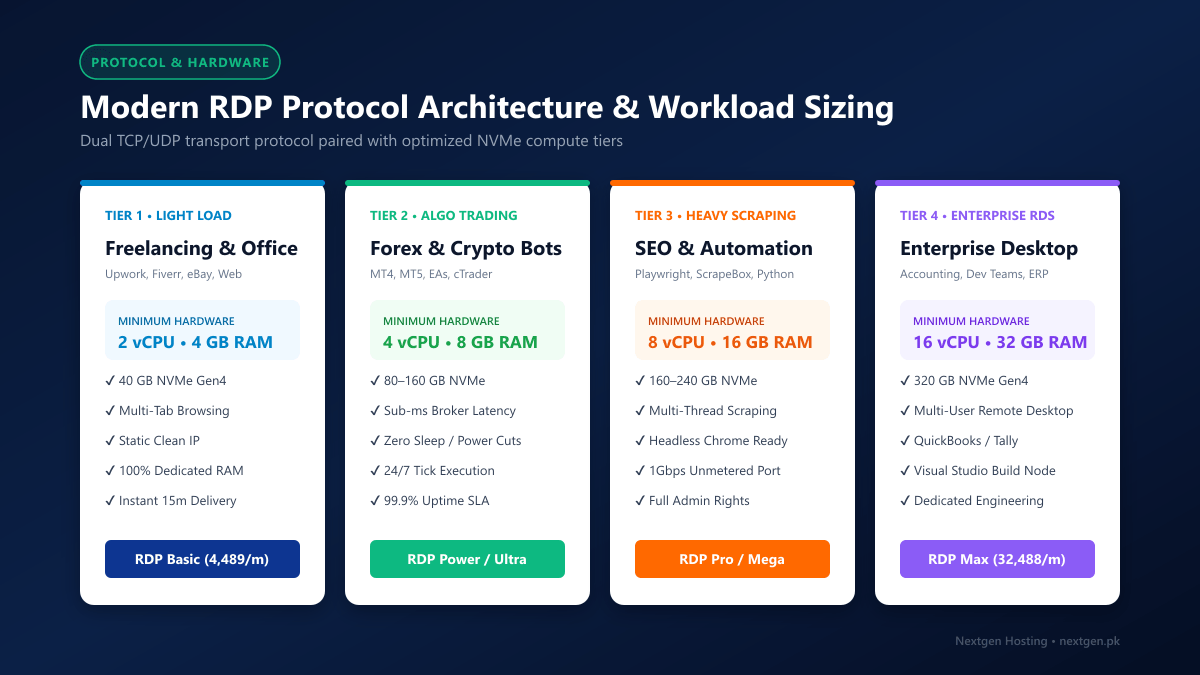
- Light Browsing & Freelancer Accounts (Upwork, Fiverr, eBay, Amazon):
- Recommended: 2 vCPU cores, 4 GB RAM, 40 GB NVMe SSD.
- Provides smooth multi-tab browsing without memory swapping while keeping costs low.
- Forex / Crypto Algorithmic Trading (MT4 / MT5 Expert Advisors):
- Recommended: 4 vCPU cores, 8 GB RAM, 80 GB NVMe SSD.
- Ensures continuous background execution, zero chart lag, and sufficient buffer for multiple terminal instances.
- SEO Automation, Web Scraping & Multi-Browser Anti-Detect Tools:
- Recommended: 8 vCPU cores, 16 GB RAM, 160–240 GB NVMe SSD.
- Accommodates headless Chrome/Playwright instances, ScrapeBox thread pools, and large SQLite/PostgreSQL databases.
- Enterprise Multi-User Terminal & Software Compilation:
- Recommended: 16 vCPU cores, 32 GB RAM, 320 GB NVMe SSD.
- Built for simultaneous team logins, Visual Studio enterprise compilation, and Docker containers.
If you plan to run automated scrapers like Puppeteer or Selenium alongside multiple browser windows, RAM is your primary bottleneck. Allocate at least 1GB of dedicated RAM per 5 concurrent headless tabs to prevent out-of-memory crashes.
4. Official Nextgen RDP Server Pricing Plans & Direct Ordering
Nextgen Hosting provides high-speed, isolated Windows Remote Desktop servers powered by pure NVMe Gen4 storage, dedicated ECC RAM, 1Gbps unmetered network ports, and seamless payment in Pakistani Rupees (PKR) via JazzCash, EasyPaisa, Raast, and local bank transfer.
Tier 1: Global Admin Windows RDP Plans (International 1Gbps Uplink)
Engineered for global internet speed, international commerce, forex trading, and automated scraping workflows.
| Plan Name | vCPU | Dedicated RAM | NVMe Storage | Network Port | Monthly Price | Direct Order Link |
|---|---|---|---|---|---|---|
| RDP Basic | 2 vCPU | 4 GB | 40 GB NVMe | 1Gbps (20 TB) | Rs. 4,489 /mo | Order RDP Basic → |
| RDP Power | 4 vCPU | 8 GB | 80 GB NVMe | 1Gbps (20 TB) | Rs. 10,478 /mo | Order RDP Power → |
| RDP Ultra (Most Popular) | 4 vCPU | 8 GB | 160 GB NVMe | 1Gbps (20 TB) | Rs. 13,485 /mo | Order RDP Ultra → |
| RDP Pro | 8 vCPU | 16 GB | 160 GB NVMe | 1Gbps (20 TB) | Rs. 17,670 /mo | Order RDP Pro → |
| RDP Mega | 8 vCPU | 16 GB | 240 GB NVMe | 1Gbps (20 TB) | Rs. 21,499 /mo | Order RDP Mega → |
| RDP Max | 16 vCPU | 32 GB | 320 GB NVMe | 1Gbps (20 TB) | Rs. 32,488 /mo | Order RDP Max → |
👉 Compare detailed specifications on our Global Windows RDP Plans page.
Tier 2: Domestic Pakistan Local RDP Servers (5ms Local Latency)
Designed for users requiring a native Pakistani IPv4 address, single-digit millisecond latency across Pakistan, local banking app authentication, and FBR IRIS compliance.
| Plan Name | vCPU | Dedicated RAM | NVMe Storage | Monthly Bandwidth | Monthly Price | Direct Order Link |
|---|---|---|---|---|---|---|
| RDP Basic (PK) | 1 vCPU | 2 GB | 50 GB NVMe | 2 TB Bandwidth | Rs. 13,500 /mo | Order Basic (PK) → |
| RDP Plus (PK) | 2 vCPU | 4 GB | 80 GB NVMe | 4 TB Bandwidth | Rs. 22,500 /mo | Order Plus (PK) → |
| RDP Ultra (PK) (Top Rated) | 4 vCPU | 8 GB | 160 GB NVMe | 6 TB Bandwidth | Rs. 36,000 /mo | Order Ultra (PK) → |
| RDP Pro (PK) | 6 vCPU | 16 GB | 350 GB NVMe | 8 TB Bandwidth | Rs. 72,000 /mo | Order Pro (PK) → |
👉 Explore local peering and data center specifications on our Pakistan RDP Servers page.
5. Performance Tuning: Eliminating Lag, Screen Stutter & High Ping
If your remote desktop session feels sluggish over local broadband (PTCL, Nayatel, StormFiber), apply these proven optimizations:
1. Configure RDP Client Experience Settings
In the Windows Remote Desktop Connection (mstsc) client, click Show Options -> Experience tab:
- Set connection speed to: WAN (10 Mbps or higher with high latency).
- Uncheck Desktop composition and Show window contents while dragging.
- Keep Font smoothing checked to ensure crystal-clear text readability without video decoding overhead.
2. Enable UDP Transport in Group Policy (Local Computer Policy)
Ensure UDP is enabled on both client and server to prevent TCP congestion bottlenecks:
- Open
gpedit.msc. - Navigate to:
Computer Configuration -> Administrative Templates -> Windows Components -> Remote Desktop Services -> Remote Desktop Session Host -> Connections. - Set Select RDP transport protocols to: Use both UDP and TCP.
3. Registry Bandwidth Tuning
Increase the desktop rendering frame rate and disable network throttling via PowerShell:
# Optimize RDP frame rate limit to 60 FPS
Set-ItemProperty -Path 'HKLM:\SYSTEM\CurrentControlSet\Control\Terminal Server\WinStations' -Name "DWMFRAMEINTERVAL" -Value 15 -Type DWord

# Disable network throttling index for multimedia streaming
Set-ItemProperty -Path 'HKLM:\SOFTWARE\Microsoft\Windows NT\CurrentVersion\Multimedia\SystemProfile' -Name "NetworkThrottlingIndex" -Value 0xFFFFFFFF -Type DWord
6. Enterprise Bare-Metal Infrastructure vs. Virtual RDP
When should your company transition from a virtualized RDP server to a dedicated bare-metal server?
- Zero Virtualization Penalty: When running resource-intensive enterprise databases (MSSQL, Oracle) or hundreds of concurrent containerized workloads that require raw hardware access.
- Dedicated Physical Storage: When you need direct-attached PCIe Gen4 NVMe drives configured in hardware RAID-10 for guaranteed millions of IOPS.
- Enterprise Solutions: Explore our global Dedicated Servers for multi-gigabit international transit or our Dedicated Servers in Pakistan for domestic data sovereignty, healthcare compliance, and banking grade security.
7. Frequently Asked Questions (FAQs)
What is the delivery time after placing an order?
Your server details are automatically provisioned and sent to your email within 15 to 30 minutes after payment verification.
Can I install custom third-party software on my RDP?
Yes. Every Nextgen RDP server includes full Windows Administrator privileges. You have total freedom to install MT4/MT5, Chrome, Firefox, Python, Node.js, Visual Studio, QuickBooks, or any software your workflow requires.
What payment gateways do you accept in Pakistan?
We accept JazzCash, EasyPaisa, Raast QR / IBAN instant transfer, direct online bank transfers from all Pakistani banks (Meezan, HBL, Alfalah, MCB, etc.), and international credit/debit cards (Visa, MasterCard).
Can I reboot or reinstall my server at any time?
Yes. You receive access to the Nextgen Client Portal, where you can reboot, shut down, power cycle, or perform a clean reinstall of your Windows operating system with a single click.
Deploy Your High-Performance RDP Server
Eliminate lag with guaranteed dedicated RAM, pure NVMe Gen4 storage, and 99.9% uptime. Choose global 1Gbps nodes or domestic 5ms Pakistan servers with hassle-free PKR payments.
