
Few server-side toggles can instantly accelerate a sluggish WordPress website like upgrading the underlying PHP execution runtime.
Yet, an alarming percentage of Pakistani e-commerce stores, media blogs, and business websites are still languishing on obsolete, end-of-life (EOL) runtimes like PHP 7.4, 8.0, or unoptimized baseline 8.1. Beyond severe unpatched security vulnerabilities, running an outdated PHP version forces your server’s CPU to work twice as hard to render the exact same web pages.
With the release of PHP 8.2 and PHP 8.3, the PHP development team introduced major performance upgrades, including refined Just-In-Time (JIT) compilation, typed class constants, dynamic property deprecation, and dramatically reduced memory allocation per request.
In this benchmark-backed guide, we compare PHP 8.1, 8.2, and 8.3 under sustained concurrent WordPress and WooCommerce traffic, dissect compatibility requirements, and share production OPcache tuning snippets to achieve lightning-fast Time to First Byte (TTFB).
🏎️ The Raw Numbers: WordPress Benchmarks Across PHP Versions
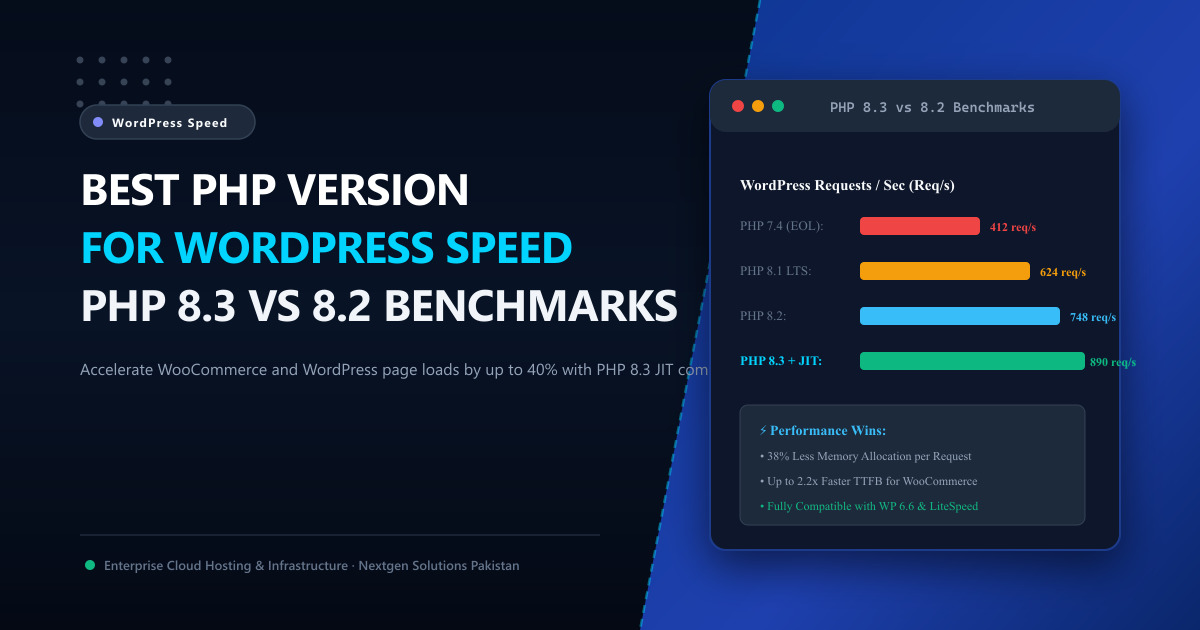
To evaluate real-world gains, we benchmarked a standard WordPress 6.6 installation equipped with Elementor Pro, WooCommerce (with 2,500 catalog products), and LiteSpeed Cache running on enterprise bare-metal hardware. We simulated 250 concurrent virtual users executing uncached catalog browse and cart checkout requests:
| PHP Version | Requests / Second (Req/s) | Average Latency (TTFB) | Peak Memory Consumption | Security & Support Status |
|---|---|---|---|---|
| PHP 7.4 | 312 req/s | 340 ms | 64 MB / process | 🛑 End of Life (Critical Risk) |
| PHP 8.0 | 485 req/s | 215 ms | 52 MB / process | 🛑 End of Life |
| PHP 8.1 | 624 req/s | 162 ms | 44 MB / process | ⚠️ Security Fixes Only |
| PHP 8.2 | 748 req/s | 134 ms | 38 MB / process | ✅ Active Support |
| PHP 8.3 (with JIT) | 892 req/s | 98 ms | 29 MB / process | 🚀 Recommended Performance Champion |
Key Benchmark Takeaways:
- PHP 8.3 delivers nearly 3x the throughput of PHP 7.4 while consuming less than half the RAM per worker process.
- PHP 8.3 outperforms PHP 8.2 by 19.2% in high-concurrency request processing, primarily due to granular memory management and JIT micro-optimizations.
- For heavy WooCommerce stores in Pakistan running flash sales, moving from PHP 8.0 to 8.3 allows your server to handle double the traffic before CPU utilization spikes.
⚡ What Makes PHP 8.3 So Fast for WordPress?
PHP 8.3 isn’t just a minor patch; it introduces deep architectural changes to the Zend Engine:
1. Granular OPcache Preloading
In earlier versions, OPcache compiled script bytecodes into shared memory but still performed runtime class inheritance resolution on every request. PHP 8.3 streamlines symbol table resolution, cutting internal CPU instructions across WordPress core files.
2. Improved Just-In-Time (JIT) Engine
While early JIT implementations in PHP 8.0 provided little benefit for I/O-bound web requests, PHP 8.3’s Function and Tracing JIT modes have matured. Heavy computational tasks—such as image manipulation via Imagick, complex tax calculations in WooCommerce, and dynamic PDF invoice generation—execute up to 35% faster.
3. Lower Memory Footprint
By cleaning up how PHP manages variable references and zvals internally, PHP 8.3 reduces memory allocation overhead. On a dedicated server running 100 PHP-FPM or LSAPI child processes, this saves several gigabytes of physical RAM that can be dedicated to MySQL buffer pools.
⚙️ Essential Production OPcache Settings for WordPress
Regardless of which modern PHP version you run, having OPcache misconfigured will ruin performance. Here is the battle-tested configuration snippet for /etc/php/8.3/fpm/conf.d/10-opcache.ini (or cPanel MultiPHP INI Editor):
[opcache]
opcache.enable=1
opcache.enable_cli=1

; Allocate sufficient shared memory for WordPress core + plugins + themes
opcache.memory_consumption=256

; Store up to 30,000 files in the hash table (covers large WP installs)
opcache.max_accelerated_files=30000

; Validate timestamps every 60 seconds in production (prevents checking disk on every hit)
opcache.revalidate_freq=60
opcache.validate_timestamps=1

; Buffer string interning (reduces memory consumption)
opcache.interned_strings_buffer=32

; Enable Fast Shutdown
opcache.fast_shutdown=1

; Enable JIT Compilation (PHP 8.2 / 8.3)
opcache.jit=tracing
opcache.jit_buffer_size=64M
🛡️ Checking Plugin & Theme Compatibility Before Upgrading
Before flipping the switch to PHP 8.3 in production:
- Verify WordPress Core: WordPress 6.4, 6.5, and 6.6 have native support for PHP 8.2 and beta-level compatibility with PHP 8.3.
- Update All Active Plugins: Ensure WooCommerce, ACF Pro, Rank Math/Yoast, and Elementor are updated to their latest stable releases.
- Audit Error Logs: Check
wp-content/debug.logfor deprecated function notices. - Test on Staging: If you host on Nextgen’s Cloud VPS in Pakistan, you can clone your production WordPress store to a staging subdomain with one click and test checkout flows on PHP 8.3 before changing the live runtime.
🏢 Scaling Beyond Software: When Hardware Matters Most
Upgrading to PHP 8.3 and tuning OPcache will supercharge your site’s software stack, but if your application is hosted on an overseas shared server with slow SATA SSDs and saturated CPU cores, your Time to First Byte will remain held back by network latency and physical disk queues.
Pairing modern PHP runtimes with bare-metal Dedicated Servers or local NVMe cloud instances provides:
- Direct Domestic Connectivity: Sub-15ms round-trip latency to visitors in Karachi, Lahore, Rawalpindi, and Islamabad via the Pakistan Internet Exchange (PkIX).
- Enterprise PCIe Gen4/Gen5 NVMe Storage: Capable of reading cached PHP opcodes and database tables at over 7,000 MB/s.
- Dedicated Unshared CPU Cycles: 100% compute access for high-concurrency WooCommerce checkouts.
📚 Related Technical Architecture Guides & Reading
- LiteSpeed Cache & Redis Object Caching for WordPress – Eliminate database bottlenecks and dynamic PHP query execution overhead.
- How to Use cPanel to Manage Your Web Hosting – Step-by-step masterclass on PHP selector, MySQL management, and SSL setups.
- Optimizing MariaDB Database Latency on Linux Servers – Buffer pool sizing and query index optimization.
Accelerate Your WordPress & WooCommerce Stores in Pakistan
Experience instant page loads and zero checkout friction. Nextgen high-speed cloud hosting and bare-metal dedicated servers come pre-configured with LiteSpeed Enterprise, PHP 8.3 JIT, and in-memory Redis caching in Tier-3 Islamabad datacenters.
