
There is a tragic, repeatable pattern in the Pakistani IT and web hosting sector: A company runs a lucrative e-commerce store, a software agency, or an enterprise database platform. They believe they are completely protected because they have “daily backups” scheduled inside cPanel.
Then, disaster strikes:
- A sophisticated ransomware intrusion encrypts the entire root filesystem, including
/backup/. - A hardware RAID controller suffers a catastrophic surge, taking all physical NVMe drives down with it.
- An accidental command line syntax typo (
rm -rf /) obliterates active files and local backups simultaneously.
When your backups reside on the same physical server or inside the same storage rack as your production data, you do not have a backup—you have a single point of failure waiting to happen.
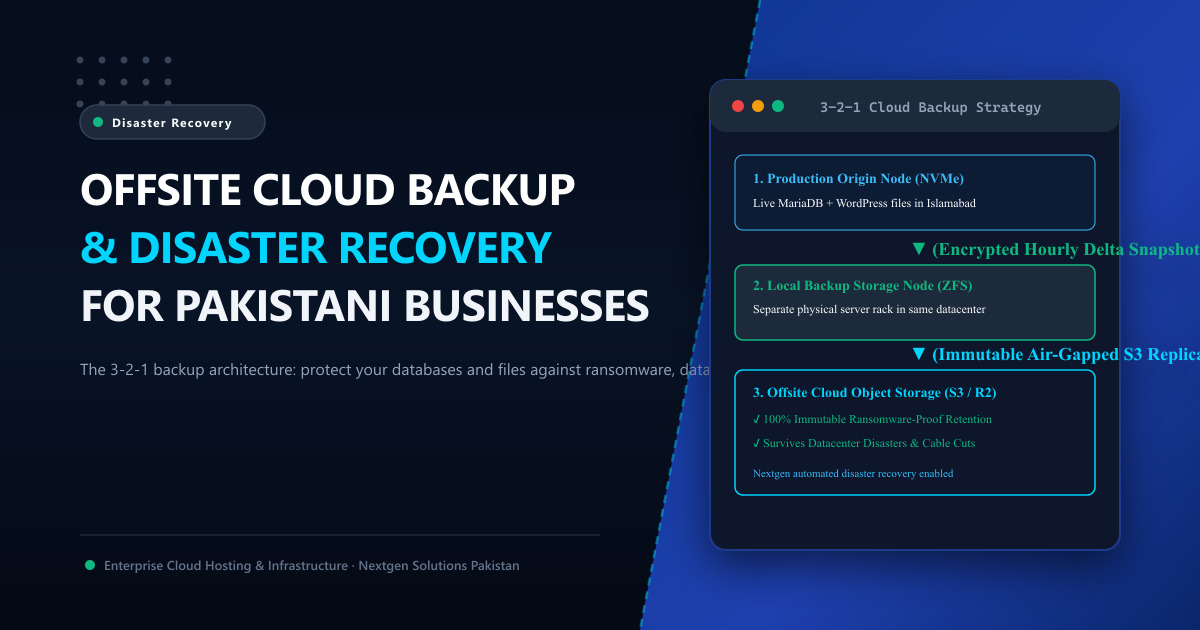
The only defense against hardware destruction, ransomware extortion, and catastrophic human error is an Offsite Cloud Disaster Recovery Architecture built on the 3-2-1 Backup Rule.
In this engineering guide, we break down how to implement automated, immutable offsite backups for cPanel, Linux VPS, and bare-metal dedicated servers in Pakistan.
🏛️ The 3-2-1 Backup Rule Explained for Production Servers
The 3-2-1 strategy is the gold standard mandated by cybersecurity frameworks, SECP compliance, and the State Bank of Pakistan (SBP):
+--------------------------------------------------------------------------+
|                          THE 3-2-1 BACKUP MATRIX                         |
|                                                                          |
|  [ 3 Copies of Data ]    1 Production Primary Copy + 2 Redundant Backups |
|                                                                          |
|  [ 2 Different Media ]   Local High-Speed NVMe/ZFS Storage + Remote S3   |
|                                                                          |
|  [ 1 Offsite Location ]  Geographically Isolated Datacenter / Cloud Tier |
+--------------------------------------------------------------------------+
[ Primary Production Server (Islamabad) ]
│
├──── Hourly Snapshot ───► [ Local High-Speed ZFS Storage Node ]
│ (Instant 5-minute file restorations)
│
└──── Daily Delta Encrypted ──► [ Offsite S3 Object Storage (Air-Gapped) ]
(Immutable: Survives Ransomware & Floods)🔒 The Power of “Object Lock” & Immutability Against Ransomware
Modern cybercriminals who breach Linux servers no longer encrypt data immediately. They spend weeks silently moving laterally:
- They locate backup scripts in
/etc/cron.daily/. - They extract S3 credentials from configuration files.
- They delete or overwrite all historical cloud backups.
- Finally, they encrypt the live server and demand a massive ransom!
The Immutable S3 Defense:
By configuring your remote backup target (AWS S3, Wasabi, or Cloudflare R2) with S3 Object Lock (Write Once, Read Many - WORM):
- Once a backup archive is uploaded, it mathematically cannot be modified, overwritten, or deleted by anyone—not even the root Linux user or account administrator—until a mandatory retention period (e.g., 30 days) expires!
- Even if a hacker gains full root SSH access to your server, your historical offsite backups remain 100% untouched and ready for clean restoration.
⚙️ Step-by-Step: Configuring Remote S3 Backups in WHM / cPanel
If you administer a cPanel VPS or dedicated server, configuring native remote backups takes less than 10 minutes:
Step 1: Open Backup Configuration in WHM
- Log into WHM (
https://your-server:2087). - Search for Backup Configuration.
- Under the Backup Type tab, select Compressed.
- Check Enable Backups and choose your retention schedule (e.g., keep 7 daily, 4 weekly, and 3 monthly snapshots).
Step 2: Add Remote Cloud Storage Destination
- Navigate to the Additional Destinations tab.
- Under Destination Type, select Amazon S3 (or S3-Compatible Storage like Wasabi, MinIO, or Backblaze B2).
- Fill in the credentials:
- Bucket Name:
your-company-immutable-backups - Access Key ID & Secret Access Key: (Use an IAM user with restricted bucket permissions).
- Bucket Name:
- Click Save and Validate Destination.
WHM will automatically package client databases, home directories, email accounts, and SSL certificates every night, stream them over an encrypted TLS tunnel, and push them to your offsite cloud bucket!
💻 CLI Automation for Raw Linux VPS & Bare-Metal Nodes (rclone)
For custom Docker clusters, Node.js applications, and MariaDB Galera nodes, the industry-standard tool for encrypted cloud replication is rclone:
Automated Daily Offsite Backup Script (/usr/local/bin/offsite_backup.sh):
#!/bin/bash
DATE=$(date +%Y-%m-%d_%H-%M-%S)
BACKUP_DIR="/tmp/backup_$DATE"
mkdir -p "$BACKUP_DIR"

# 1. Dump MySQL Databases with transactions locked safely
mysqldump --all-databases --single-transaction --quick | gzip > "$BACKUP_DIR/databases.sql.gz"

# 2. Archive Application Files
tar -czf "$BACKUP_DIR/web_files.tar.gz" /var/www/html/

# 3. Encrypt and Stream directly to Offsite S3 Bucket
rclone copy "$BACKUP_DIR" remote_s3:production-backups-immutable/daily/ \
    --transfers=4 --checkers=8 --fast-list

# 4. Clean up temporary local scratch files
rm -rf "$BACKUP_DIR"
Set this script to run automatically at 2:00 AM via cron (crontab -e).
🏢 Enterprise Disaster Recovery with Nextgen
Backups are only as good as your ability to restore them quickly. Having a 200 GB cloud backup is useless if restoring it takes 36 hours over a congested foreign network!
When you partner with Nextgen for Cloud VPS in Pakistan or enterprise Dedicated Servers in Pakistan:
- We operate dedicated private 10Gbps backup networks inside Tier-3 Islamabad datacenters.
- Our disaster recovery engineering team tests and verifies automated restoration workflows quarterly.
- Enjoy rapid bare-metal image recovery that gets your mission-critical applications back online in minutes, not days.
📚 Related Technical Architecture Guides & Reading
- How to Create a WordPress Staging Site in cPanel: Safe Zero-Downtime Tutorial – Safely test plugin updates and database migrations before production.
- How to Migrate cPanel to Another cPanel Server with Zero Downtime – Full WHM transfer tool and delta syncing playbook.
- Colocation Hosting Benefits in Pakistan: Moving Beyond Office Closets – Physical redundancy, N+1 generators, and Tier-3 datacenter defense.
Deploy Enterprise Disaster-Proof Cloud Infrastructure in Pakistan
Protect your corporate data against hardware crashes and cyberattacks. Nextgen provisions high-performance Cloud VPS and bare-metal dedicated servers with automated offsite cloud snapshots in Tier-3 Islamabad datacenters.
